


Price: ₹2,999 - ₹396.00
(as of Jul 14, 2026 22:50:14 UTC – Details)
Product Description


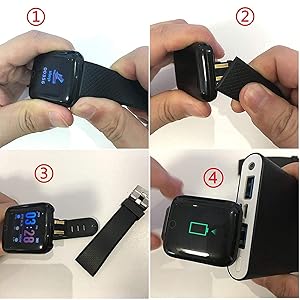
How do I charge the smartwatch?
This smartwatch does not come with a separate charger.Remove one strap to reveal the USB charging pin.Plug the Yellow Pin side directly into any Standard mobile charger, Power Bank or laptop USB port.
Tip: Charge at least 2 hours before first time use.
IMPORTANT : DO NOT USE FAST CHARGER TO CHARGE.

How to Setup Smartwatch for the first time/How to Set Date and Time on Smartwatch –
Follow these simple steps to set up your watch:
Step 1 – Charge Your Watch First
Before using for the first time, charge your watch for at least 2 hours using any standard mobile charger or Power Bank.Once charging starts, the screen will light up showing charging symbol.
Step 2 – Download the App
On your smartphone, go to: Google Play Store (for Android phones) OR Apple App Store (for iPhones).Search for “FitPro” and install the app.
Step 3 – Turn on Bluetooth on Your Phone
Open your phone’s settings.Switch Bluetooth ON.Important: Do not connect the watch from Bluetooth directly. Always connect it through the Fitpro app.
Step 4 – Open the FitPro App
Open the Fitpro app and allow permissions (like Bluetooth, Location, Notifications).Permissions are important so the watch can send alerts and sync health data.
Step 5 – Pair the Watch with the App
In the FitPro app, go to “Set” → “Bind Device to experience more features” (Highlighted in Green Colour).Wait for the app to search → You’ll see a device name – 716.Tap it → The app will connect to your smartwatch.
Step 6 – Confirm Connection
Once connected, the watch will automatically update the time and date.Your steps, sleep, and heart rate will start showing in the app.You’ll also begin to receive call, SMS, and app notifications on the watch.
Troubleshooting (if not connecting)
Restart Bluetooth on your phone and try again.If still not working, reset the smartwatch by navigating to More > Reset. Once Reset is done, try to connect the watch by following Step 5Inside the app, tap Unbind Device, then Add Device again.Keep the watch close to the phone (within 10 cm) while pairing.
FREQUENTLY ASKED QUESTIONS –
1. Which app is compatible with Smartwatch?
Download the “FitPro” app from Google Play Store or Apple App Store.
2. My watch is not turning on. What should I do?
Charge the watch for minimum 2 hours before first use.It will power on automatically after charging.
3. How can I extend battery life?
Disconnect Bluetooth when you don’t need real-time notifications.Your steps, time and activity data will still be stored and sync when you reconnect.
4. I need more help. What can i do?
You can connect with Bouncefit Customer Care at +91-9560335864 (Timings 10 AM to 8 PM).
NOTE- NO CALLING FEATURE-You will receive only notification to See Calls & Messages on Your Wrist: Receive/Rejection call, calendar, SMS and SNS (Facebook, WhatsApp, LinkedIn, Instagram, and Twitter) notifications on display, fitness tracker band let you never miss the messages that matter.
Water proof Smart fitness Watch with Bluetooth And Heart Rate sensor, Activity Recorder, Sleep Monitor, Calorie Counter, Call Notifications, Alarm, Message, Usb Charging Supports smart phones, Tablets and PC’s and also support Android and IOS
All-day activity tracking: Track steps, distance, calories burned, active minutes, you can check daily activity and time on OLED display or APP
Quick Charge : 20 Minutes of Charge will give 1 Day full Battery Backup. Single Touch Interface : The Screen of the Smartwatch offers a unique single touch interface which means full screen touch is not available
NOTE -Charger is not available with this watch it has in built usb port remove the strap of watch carefully than u can see usb port which u can attach easily with any laptop,pc,mobile charges to charge. For Any Product Issue Please Contact Us on Customer Care and please Install the App – FIT PRO to use the Smart watch